JOBMUST

Friday, February 15, 2019

๐Ÿ’ป How To Get and Use Your Own Domain Name

For a professional touch that looks great on resumes and business cards.

How To Get and Use Your Own Domain Name

Photo by Samuel Zeller

A JobMob reader asked:

I have a professional question. Do you know how someone gets a domain name that is their name? As in jacob@jacobshare.com?

There are actually 2 parts to the question:

  1. How to get a domain name?
  2. How do I get my own domain name for a website and/or email?

Let's do this.


Get 46% off a new .com domain until February 19th, 2019
Namecheap banner for 46% off .com domain registration


How to get a domain name

First, a little terminology.

http://bit.ly/2V1dD34 is a fully-qualified domain name where:

  • www is the hostname
  • jobmob.co.il is the domain name, and
  • .il is a country-code top-level domain or ccTLD, or even just TLD for short.

Before looking, you need to know what you’re looking for.

A good format to start with is firstnamelastname.com, because if anyone is likely to guess what your personal website would be, that’s probably the first address they would guess if you’re in America, at least. Otherwise, aim for the most popular TLD in your own country such as .ca or .co.uk.

If you have a middlename, you could also look for firstnamemiddlenamelastname.com but only do this if your middlename is used in your personal brand name, in which case you should aim for this format BEFORE trying for firstnamelastname.com.

Next, before you can buy your domain (or any other), you need to check if it’s even available and not already owned or being used by someone else.

This is one time where a Google search is NOT the best way to go.

Instead, you would do what’s called a “WHOIS search” using a site such as… what else… who.is. You simply type in the domain name you’re looking for, and click to search. The results will tell you who owns it or that it isn’t owned at all, in which case you can buy it via a domain name registrar, an online seller of domain names.

Better yet, do the whois search via a reputable domain name registrar because if the domain is available, the registrar might propose a discount to “buy it now!” or propose a similar domain that you can “buy now!”

I use and recommend Namecheap, which has a monthly coupon for discounts on new domain registrations. I’ve been with them since 2006, and they have great customer support too. (I like their text chat support service, which I've used both from my PC and my smartphone.)

What happens if your domain is NOT available?

You could try to buy it from the current owner, but that can get expensive. It’s a lot easier to:

  1. Change TLDs and buy the e.g. .net or .org version instead of the .com version of the domain, or
  2. Change the format e.g. buy firstname-lastname.com or lastnamefirstname.com

Of these two options, it’s much better to change the TLD. People are more likely to remember firstnamelastname.net than a hyphen or lastnamefirstname.

Namecheap‘s search will automatically tell you if the domain is available with dozens of different TLDs.

Once you find an available domain, create a Namecheap account and buy your domain. It only takes a minute.

Now you're ready to use it for a personal website and your own branded email address (which would be a great job search email address, if you don't already have one).

How to get an email address or website with your domain name

If you bought the domain name for personal branding purposes, the most common thing to do with the domain – by far – is to use it for your personal brand's website.

Less common – but almost as impressive – is to use the domain for your email too.

When you surf the web, the webpages you visit are simply groups of files that your browser copied from another computer over the Internet.

Likewise, when you check your email in software such as Outlook/Thunderbird/etc., the messages you download are simply groups of files that your email software copied from another computer over the Internet.

In both cases, that other computer is called a server because your computer (the client) is asking it to serve (give) files that it hosts or stores.

To find the different kinds of files being hosted, we use a different hostname.

For example, my business email used to be served from mail.shareselectmedia.com and my business website was once served from http://bit.ly/2EbrfmM but nowadays, most servers are configured so that if no hostname – in this case, www – is specified, the server will automatically assume you want to see the website at e.g. shareselectmedia.com.

Now that you understand that your website and email need to be hosted on a server somewhere, how do you actually make that happen with your new domain name?

Your options are:

  1. Personal hosting
  2. Web and email hosting with separate companies
  3. Web and email hosting with the same company

1) Personal hosting

This is the Do It Yourself option.

You configure your home computer (or a computer in your home) to host and serve both your website and your email using your domain name.

As you can imagine, this setup requires significant technical skill.

I don't recommend you take this route unless you know what you're doing, and even then I probably wouldn't recommend it.

2) Web and email hosting with separate companies

Much less complicated than the first option but still somewhat complicated because it involves managing accounts at different companies, this option tends to be the one preferred by people with very specific needs.

You might consider this option if you want to build your personal website using blog platforms like WordPress.com (not self-hosted WordPress) or Tumblr or a click-to-build platform like Wix.

In my case, all my websites are currently hosted with WPX Hosting, and because I like Gmail, my work email is hosted on G Suite, the business version of Gmail/Google Docs/etc.

Since my work email uses the shareselectmedia.com domain which is registered with Namecheap, that's where I needed to configure the domain to work with G Suite.

However, even this simpler option is overly complicated for most people. If that's you, choose the next option.

3) Web and email hosting with the same company

Many people choose this option, especially the first time around like I did, and it's often the best choice for quality vs. simplicity.

A typical scenario involves buying a hosting plan with a hosting provider.

When I first started my company, all my sites and my corporate email were hosted from the same server at a well-known hosting provider based in California. I used their cheapest plan at $20 per month, but unless you expect to have a lot of traffic to your website like I did, you can find cheaper hosting options.

Many hosting providers throw in a free domain registration when you sign up for such a yearly plan, but DO NOT use this freebie to register your personal brand domain, register it with a separate domain name registrar. (This will save you headaches if you ever decide to change hosting companies, because sometimes the fine print says that you don't even own the free domain you received on joining.)

Any decent hosting provider will have technical support who can setup your email and website to use your domain name or at worst, help you do it yourself.

They will also usually have an administration panel and tutorials explaining which forms to fill in and which boxes to check. You'll only have to do it once and since it's so common a task for the hosting company's clients, the admin panel should make it very simple.

My recommendation in this case is again to use Namecheap, which offers both cheap email hosting and web hosting services (for only a few dollars per month, combined), and get their great tech support to help configure your new domain name for whatever you need.

If you're wondering how to get your own domain name on Gmail like I did, Namecheap makes it really easy to do.


Get 46% off a new .com domain until February 19th, 2019

Namecheap banner for 46% off .com domain registration


Question of the article

Have you bought a domain before? If so, who is your favorite domain registrar and why?

A version of this article originally appeared on personalbrandingblog.com.

READ NEXT: ๐Ÿ˜Ž 7 Signs You're Actually An Expert On Anything

Subscribe to JobMob via RSS or email and follow me on Twitter for more How Tos for critical job search tools.


via JobMob More Information Here..
via JOBS MUST Check this Job Here

Friday, February 8, 2019

๐Ÿ’ผ How Creative Job Seekers and Recruiters Are Using Emojis

Great examples of good job emoji to inspire you.

Mac keyboard with emoji bar

Photo by iabzd

Back in my in Computer Science days in the '90s, most of our work in the labs was spent facing screens that rarely had more than two colors displayed at a time, usually  orange  or  green  text on a black background.

It was so dreary (although arguably easier to focus).

Nowadays, the bright colors of emoji are a lot more interesting to look at than plain text, and their designs get cuter and more fun all the time.

If you like that kind of thing. Which I do.

However, in the party pooper world of corporate recruitment, fun and cute don't often play well (there are some fantastic exceptions).

A 2017 study called “The Dark Side of a Smiley: Effects of Smiling Emoticons on Virtual First Impressions” concluded that:

In face-to-face contact, smiling individuals are perceived as warmer and as more competent than non-smiling individuals… [but] contrary to actual smiles, smileys do not increase perceptions of warmth and actually decrease perceptions of competence.

Reading a little deeper, the implication is more that you should avoid using emojis in a work context when trying to impress people who don't know you, while the work emoji use is OK with people who do, such as colleagues, collaborators, etc.

As you'll see below, job seekers seem to be taking this lesson to heart while, surprisingly, it's recruiters who haven't been getting the message.

Here are some of the creative ways job seekers and recruiters are using emoji.


Note: There is a poll embedded within this post, please visit the site to participate in this post's poll.

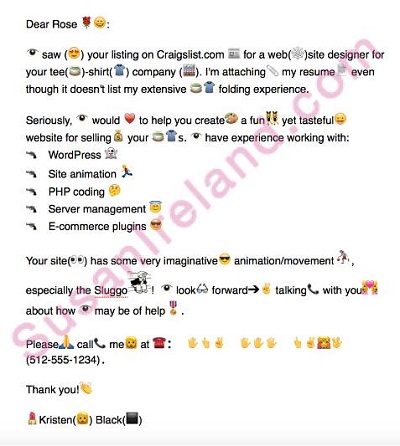
Emoji cover letter

This was actually created as a joke to write in emoji:

emojis in a resume cover letter sample

Emoji resume

Although they don't often send them to recruiters, designers love to make creative resumes to show off their skills, and this one is no different:

Emoji job board infographic ad

Hat tip to @vickisalemi:

Emoji recruitment ad for job seeking recruiters

Funny literal translation:

Emoji used in a recruitment ad for engineers and developers

Work emoji job descriptions

Recruitment marketing company TMP Worldwide challenged their employees to describe their jobs in these great emoji combinations.

John Elstad, SEO Director:

john elstad emoji

Josh Phillips, SEM Team Lead:

josh phillips emoji

Sehare Hemani, Content Marketing Manager:

sehare hemani emoji

Chris Grasso, Vice President, Business Development:

chris grasso emoji

Ali Kelley, Content Marketing Specialist:

ali kelley emoji

Emoji job applications

In 2016, L'Oreal asked people to apply for jobs with emojis:

Job rejection via emoji

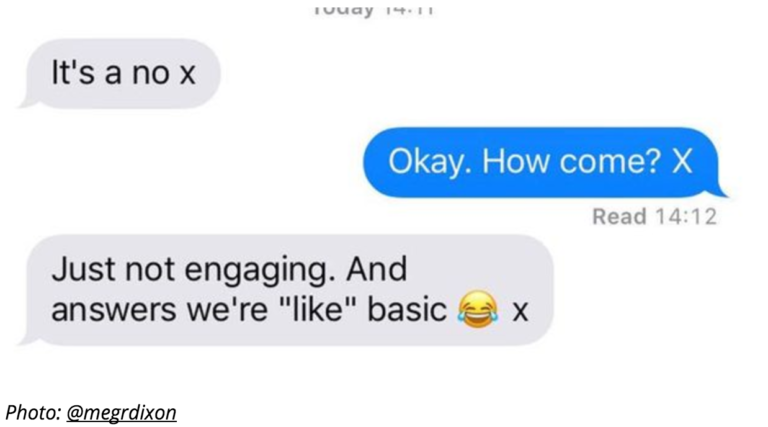
It wasn't so funny when a restaurant in the UK rejected a waitress applicant with a laughing emoji:

text message exchange

The restaurant later apologized, explaining that “the texts were sent in error and were intended for our manager, not the candidate. However, we expect our team to act professionally at all times and to give constructive feedback after any interview via email.”

Emoji job interview feedback

GiveAGradAGo came up with funny emoji combos that summarise how a job interview went:

“You love the company but you're unsure about the salary”

company salary emoji

“You’re quickly on your way to the top”

way to top emoji

“You were too nervous / shy to ask the right questions”

job interview emoji

“You turned up late to the interview”

late at interview emoji

“You got the job, signed the contract, feeling magic, beers”

got the job emoji

Emoji poem about the lack of women in corporate workplaces

women in workplace emoji

Sadly, even career emoji equality took a few years to happen.

Question of the article

Have you seen emoji used in job search or recruitment? What kind of impression did it leave on you? Tell us in the comments

What others are saying

Another take:

Subscribe to JobMob via email and follow me on Twitter for more great job emoji stories and tips.


via JobMob More Information Here..
via JOBS MUST Check this Job Here

Wednesday, December 19, 2018

๐Ÿ† Top Job Search Articles of 2018

2018's most popular job search blog posts from the most popular job search bloggers.

keyboard, pen, coffee mug and cherries on a desk

Photo by Leone Venter

At the end of every year, I reach out to dozens of job search experts to ask for their top job search-related articles from the past 12 months.

Which is your favorite? Tell us in the comments.

Enjoy!

Free bonus: Download a PDF version of this article to use as a handy reference. Download it now.

Top Job Bloggers' Best Job Search Articles of 2018

This list is brought to you by JobTestPrep:

JobTestPrep personality test

donna svei avatar Donna Svei: Use This 10X Job Search Strategy
jessica h hernandez avatar Jessica Hernandez: 131 Resume Writing Tips – The Most Comprehensive List of Resume Writing Tips on the Internet
will thomson avatar Will Thomson: The CANDIDATES Are Just Not That Into You!
lindsey pollak avatar Lindsey Pollak: How To Get a Job After Graduation: Ten Tips To Stand Out and Get Noticed
meg guiseppi avatar Meg Guiseppi: 7 Reasons NOT to Copy Someone Else’s LinkedIn Profile
mary elizabeth bradford portrait Mary Elizabeth Bradford: Top 10 Executive Resume Writing Tips for 2019
marc miller portrait Marc Miller: How Long Will My Job Search Take? Longer Than You Think! [Updated]
rosa e vargas avatar Rosa Elizabeth Vargas: Infographic Executive Resumes: When To, How To, and What Not To
jim stroud portrait Jim Stroud: Microchipping Employees is a No-good, Horrible and Terrible Idea
hannah morgan avatar Hannah Morgan: What’s the Best LinkedIn Headline For An MBA Candidate?Resume Tips for 2018
wendy terwelp avatar Wendy Terwelp: How to RSVP to LinkedIn Invitations from People You Don’t Know
sharon mccormick avatar Sharon McCormick: Mastering the Art of Recruiting on LinkedIn (Infographic)
adrienne tom portrait Adrienne Tom: How to Add Achievements and Measurements Into Your Resume
biron clark avatar Biron Clark: Best Sample Thank You Emails After an Interview (3 Examples)
andrew rosen avatar Andrew G. Rosen: How to Quit a Job – The Ultimate Guide to Leaving a Company Gracefully
shayna lee avatar Shayna Lee: People Problems: The Company Culture Crusade
thea kelley avatar Thea Kelley: 10 Ways to Prove Your Emotional Intelligence (Soft Skills) in a Job Interview
jacqui poindexter avatar Jacqui Barrett-Poindexter: How to Convert Your Standard Resume to a C-Level Story That Blows the Competition Out of the Water
jeremy schifeling avatar Jeremy Schifeling: Hot To Get a Referral For Any Job – Even if You're Changing Careers
janet civitelli avatar Janet Scarborough Civitelli: Anti-Ageism Job Search Success Stories
patricia edwards avatar Patricia Edwards: 3 Job Search Blunders Older Job Seekers Make
darcy eikenberg avatar Darcy Eikenberg: When Someone You Love Hates Their Job: A Reader Question Answered
nick corcodilos avatar Nick Corcodilos: Age Discrimination: Help me market my dad!

JobTestPrep personality test

Free bonus: Download a PDF version of this article to use as a handy reference. Download it now.


jeff lipschultz avatar Jeff Lipschultz: Smart Strategies to Answer to Behavioral Interview Questions
erin kennedy avatar Erin Kennedy: 3 Tips for Writing a Career Change Resume
careeralley avatar Joey Trebif: How To Print Your Resume Professionally
jenny foss avatar Jenny Foss: Need Money While Job Hunting? Cash Gigs You Can Start Today
david shindler avatar David Shindler: Lack Experience? How to Show Your Potential to Employers
mark anthony dyson avatar Mark Anthony Dyson: 14 Easy Modern Job Search Tips to Use in 2019
brad waters avatar Brad Waters: How Job Interviews Really Work
dana leavy detrick avatar Dana Leavy-Detrick: 4 Brilliant Resume Summary Examples
anita bruzzese portrait Anita Bruzzese: 3 Ways to Better Connect With Co-Workers
susan joyce portrait Susan P. Joyce:  To Be Hired, Be Reachable – How to Safely Publish Your Contact Information on LinkedIn
robin schlinger avatar Robin Schlinger: Executive Resumes That Build Careers
teena rose portrait Teena Rose: 5 Easy Ways (+Examples) on How to Improve Your Management Resume
karalyn brown avatar Karalyn Brown: Should one typo on an application really be the basis for elimination?
gayle howard portrait Gayle Howard: Should my graphic designer jazzy up my resume?
julie walraven avatar Julie Walraven: How to decline LinkedIn invitations politely
barb poole portrait Barb Poole: Move Over IQ and EQ: AQ is Here!
margaret buj avatar Margaret Buj: Resume Accomplishments vs. Responsibilities (with examples): What’s the Difference?
marty nemko portrait Marty Nemko: You’ve Just Gotten a Job Offer…
lisa rangel avatar Lisa Rangel: The Top 4 Executive Resume Examples Written by a Professional Recruiter
debra wheatman avatar Debra Wheatman: Create A Project Plan for Your Career
miriam salpeter avatar Miriam Salpeter: How to become a recognized expert
jessica merrell avatar Jessica Miller-Merrell: Ep 134 – Future of Work: Job Search and Employee Accessibility
heather rothbauer portrait Heather Rothbauer-Wanish: Resume Tips for Applying to a Job When You’re Overqualified
jason alba avatar Jason Alba: About Careers Today, by Anon
kirk baumann avatar Kirk Baumann: Why It’s Important to Try New Things
jacob share avatar Jacob Share: ๐Ÿ’ป Top Computer Skills Your Resume Needs Today [2018]

Read next

Check out another JobMob year-end roundup:

Question for you

Is there a job blogger we missed? Make your suggestion in the comments.

Subscribe to JobMob via RSS or email and follow me on Twitter for tips from the best job search experts going into 2019.


via JobMob More Information Here..
via JOBS MUST Check this Job Here